Showing posts with label music. Show all posts

Wednesday, May 27, 2009

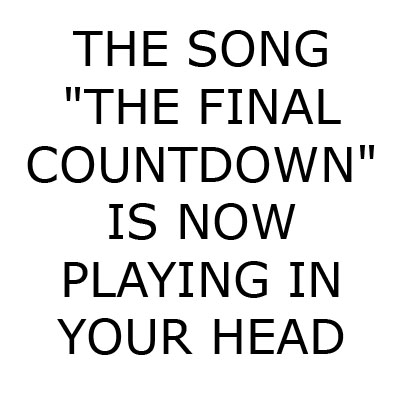
Funny stuff: musical charts

Try guessing which musics these charts refer to:


Source

Thursday, November 27, 2008

This can't be real, because if it is...

... then this guy is not only the "bike hero", he's my hero! For all Guitar Hero fans, check out this great video of how to play this game on the streets:


Source: Kotaku

Friday, November 21, 2008

You're welcome

Seen here

Wednesday, November 19, 2008

Portal: yet another one for the fans

You already know I'm a sucker for everything Portal-related. So, it's not news that I would post a video such as this one:

Friday, October 31, 2008

How to get those MP3s you want for free

In order to save some money from MP3 purchases, you can always try to find some other means of getting those MP3s you want for free. Of course not all those techniques are legal, but what did you want? It's for free...

Lifehacker has made a nice post that gives some advise on this area. For example, you can try searching the MP3 you're looking for in the Web. If that doesn't work for you, you can always download the music you want from MySpace. How about borrowing your friends' CDs or using the web? Another possibility is to grab the audio from a video. The quality is not the best but most of the files are audible.

What are your techniques to get MP3s for free?

Saturday, October 18, 2008

A banjo as a brain surgery instrument

Yes, that's right...the title is correct: a banjo can be used as a valuable brain surgery instrument.

Eddie Adcock is one of the pillars of Bluegrass Music. Recently he realised that a new found tremor in his hand could threaten his ability to perform professionally. So, he underwent brain surgery to treat the hand tremor and to test the success of the procedure, he played his banjo throughout the entire operation.

Surgeons placed electrodes in Adcock's brain and fitted a pacemaker in his chest which delivers a small current that shuts down the region of his brain causing the tremors.

Don't believe me? Check out the video:


Source: BBC News

Tuesday, October 07, 2008

The new Bond's theme music

After hearing so many people talking about how amazing the new Bond movie's theme music is, I decided to have a look at it. And indeed, the music is quite amazing. The combination Jack White/Alicia Keys didn't seem obvious when I first heard of it, but after hearing the tune, it makes you wonder why these two haven't worked together before.

You can check it out at the official website. Or you can see the video here (but the quality at the official website is better):

Monday, September 15, 2008

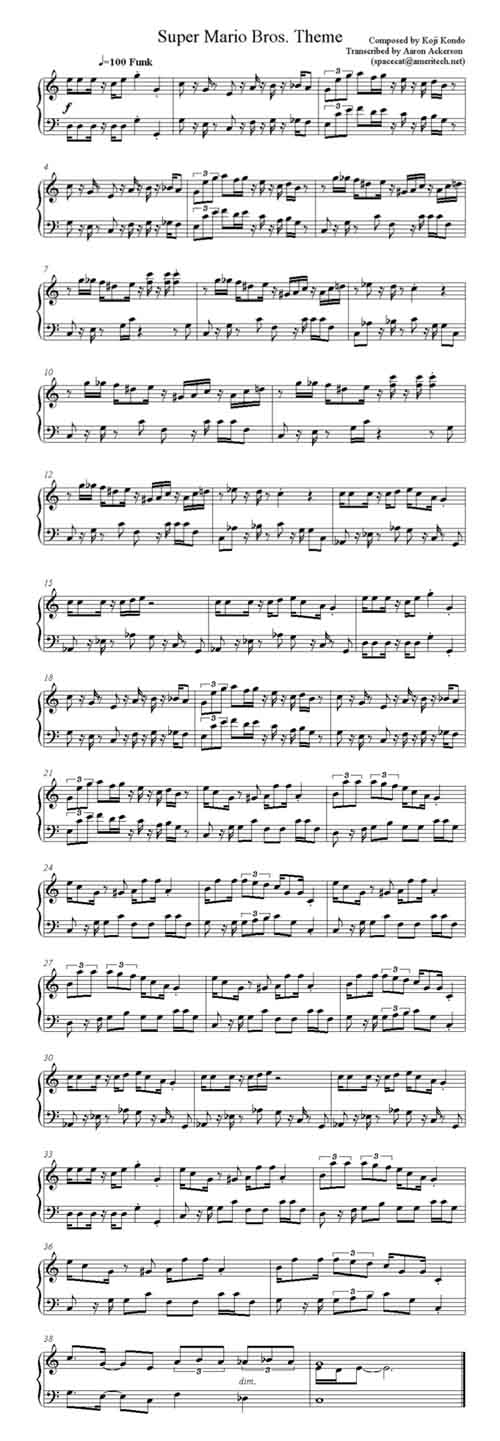
The Super Mario Bros. Theme music sheet

By now you've probably realized that I'm a huge fan of the Super Mario Bros. console game, and especially, its theme music. If you're a fan too and always wanted to play the theme in your favourite instrument, check out the music sheet here.

Wednesday, September 03, 2008

Songsterr: Learn how to play guitar online

I know how difficult it can be, sometimes, to find good guitar tabs to learn music from. Luckily, for all guitar fans out there, I found this great website, Songsterr, that, not only has great tabs, but it has a great on-line software that allows you to reproduce the tab by playing the exact notes at full speed or half-speed, allowing you to easily pick up the chords and playing techniques for specific tunes.


Have fun :-)

Monday, August 11, 2008

Retro-blogging: best posts of August 2007

And we're back! After a few days to get used to the new idea of being a Father, I'll try now to update the blog a little bit.

But for now, let's flashback to the blog's August last year's best posts:

Tuesday, July 15, 2008

When Safari and Firefox work together...

A few days ago I posted a nice tip on how to download musics from MySpace using Safari and wget in Mac OS X. In that tutorial, I showed how to use wget to download the music because in Safari I was unable to use the "save as..." function to actually save the MP3 file on the computer. I also explained why this tip didn't work with Firefox (because it doesn't have an Activity window such as Safari's).

But then I discovered that I can paste the "secret" MP3 URL in the Firefox Address Bar and then use the "Save Page as..." to actually save the file.

So, since Safari and Firefox can do some team work, you no longer need to install wget on your Mac to download musics from MySpace.

Thursday, June 26, 2008

How to download musics from MySpace using Safari and "wget" (on Mac OS X)

DISCLAIMER: even though the instructions provided in this post may be (mis)used to download copyrighted material, this blog or its author do not support any piracy activities and cannot be held responsible for what others do with the knowledge acquired here. The author disseminates this knowledge with the sole purpose of allowing users to backup musics that MySpace's publishing artists already allow users to download, which is the case in the given example.

MySpace is a great social website that has specialized in providing access to a lot of musical material from musicians around the world. Some of those musicians publish their musics in their profile and even allow downloading them (as you can see in the figure below that shows the music box for Ani DiFranco), but for doing that you have to be logged in to your MySpace account.


But what if you don't have (or don't want to create) a MySpace account? Well, that's what I'm going to show you:

  1. First of all, let me remind you that this can only be done using version 3 of the Safari web browser and a small Unix utility called wget. To install wget in Mac OS X, check here (I tried using Firefox 3 but the Page Info's Media tab (Tools -> Page Info) does not show the necessary files)
  2. So, let's start. On the music box on the musician's profile (in this example, I'll be using Ani DiFranco's profile) click on the music you want to download and let it load entirely (you'll see it loading if the blue thin line is growing in the progress bar of the music player)
  3. Open the Activity window in Safari (Go to Window->Activity)


  4. Search for the file (or files, in case you've already load several songs) with a larger size (around 3 MB - may vary depending on the duration of the song) or you can search for the file with the address having some sort of combination of the words "cache" and "music". Then, double-click it.


  5. Safari will open a new window and will start playing the music that you just selected. If you take a look at the address bar, you'll notice that the URL points out to a complex address of an MP3 file. This is MySpace's cache file for the song you selected and can be downloaded directly.


  6. However, this cannot be done in Safari. If you try using the File->Save Page as... option, you'll notice that it's not enabled. That's where "wget" gets into play.
  7. After installing "wget", the command with the same name will be available on Terminal's prompt. Just copy the URL (until the "mp3" part, as shown in the figure above) and paste it after the command at the Terminal, as you see in the following figure:


  8. This will download the file and will place it in the current directory (In the figure, you can see that I did this in ~/Desktop)
  9. Then, just use the MP3 player of your choice and enjoy! :-)
Final remarks: the cached MP3 file is often of lower quality, so don't expect perfect CD quality whilst listening. Also, the downloaded MP3 file comes with no tagging information, so you'll have to fill in everything on the MP3 management application that you choose. I didn't try this in Windows so I don't know if it's possible. If you test it in Windows, let me know the result in the comments.

Source: The Mac Newbie

Wednesday, May 07, 2008

Top 10 most creative ways of playing the Super Mario Bros. Theme

I've been a fan of the Super Mario Bros theme ever since I started playing the game when I was a little boy. It's one of those tunes that once you get inside of your head, it's difficult to get it out... but in a good way :-) And it seems that I'm not the only fan, since it only takes you a little search around the web to find highly-creative fans playing the game's theme song in the most oddly ways.


To honour the game and its great theme song, here's my top ten list of the most creative ways of playing the Super Mario Brothers theme:

First of all an Honourable mention - Doing it With a Ruler - Well, this one is not actually well played but kudos for the imagination:


#10 - With Your Hands - This one does not produce the best sound but you've got to give it credit for this unique talent:


#9 - On a Church Organ - Not the best version but you cannot help to feel the chills when you listen to the them being played in a church organ. Well, it just gives that Phantom of the Opera feeling that always creeps me out:


#8 - Tuba Duet at a Bathroom - Simple, well played and creative enough to enter the list


#7 - Blowing on Bottles - Very slow, but you have to admire the perseverance and co-ordination between all the "musicians"


#6 - Using a Remote Controlled Car - This video was actually the one that started all of this. After seeing this I thought: "Ok, I've seen it all"


#5 - With a Drum Solo - This one is just a drum solo that accompanies the theme song, but you've got to agree that it's quite amazing:


#4 - Beatboxing Flute - Quite original and a whole lot better than if it was just played in a flute:


#3 - A Capella - No matter what people say, A Capella always brings a special touch to tunes, and this version is not an exception:


#2 - As a Broadway Musical Theme - This is an absolutely amazing adaptation of the theme, featuring cabaret-like sounds and melodic entries that give the tune a really special touch:


#1 - Two Guitars and Just One Guitarist - My personal favourite featuring a very talented guitarist that uses two guitars to perfectly reproduce the theme song. I also play guitar and I can easily understand how difficult it is to co-ordinate the two hands to do something like this:


Keep in mind that this is only my personal top 10. It may not reflect other fans' opinions. But I would like to ear about your opinions. Want to help me build the top 20 list? Suggest other videos on the comments!

Enjoy!

Friday, February 22, 2008

A different kind of "Guitar" Hero

I know we're way past Christmas time, but this is to compensate those of you who didn't receive the Guitar Hero game for Christmas.


Hand Bell Hero is 4 key-based music game (like Guitar Hero) where you have to keep up with the bells and play Christmas tunes. Check it out and have fun!

Monday, February 18, 2008

Stuff's predictions for 2008

Engadget posted on the new gadget from Sony Ericsson that is supposed to run PSP games. They did this based on a scan from the Portuguese version of the Stuff magazine. What they didn't know was that this was a part of a "predictions" article for the new year from Stuff (on the January 2008 issue). Which basically means that the gadgets presented on the article are not real. Instead these are merely wild guests from Stuff's editors based on the evolution of gadget's market. They even used the expression "probability of existence" to denote the probability of these gadgets ever seeing the light of day.

So, being a Stuff subscriber, I decided to read the article again and present here some of those interesting gadgets that Stuff thinks will come up on 2008 (the given percentage is the probability of existence):

  • Asus EcoBook - a wood-based (bambu) laptop from Asus (95%)
  • iPhone 3G - the 3G version of the Apple touch phone (60%)
  • Sony Play TV - Tivo-like service for the PS3 (87%)
  • Multi-mouse Apple - mighty mouse with multi-touch technology (62%)
  • Casio Hi-Speed - a digital camera capable of capturing 60 (6 Megapixel) pictures per second (84%)
  • GPS 3D - GPS devices with 3D satellite/airplane photo maps (100% - a Portuguese company already released a product with this technology)
  • Your music follows you - a small robot that follows you around the house playing your music (which is accessed from your PC through WiFi) (89%)
  • GPS cameras - digital cameras equipped with a GPS sensor to help geo-tag your photos (66%)
  • Apple Macbook Nano - A (iPhone-like) multi-touch tablet MacBook with a Blu-Ray recorder (64%)
And for more, check out Stuff magazine :-)

Monday, January 14, 2008

Pandora's Box has been opened...again!

On May 2007, Pandora made the unfortunate decision of going "offline" for non-US users. I got very upset because Pandora was my main source for discovering new music (based on my musical taste).

Fortunately, new services appeared (such as Last.fm), which offered similar mechanisms of searching/listening music. However, the engine behind Last.fm was not as good as Pandora's. The Pandora system is connected to the Music Genome Project, a project that has been trying to define the "genes" of music, thus making way to establish more interesting connections between artists and songs.

The project analyzes the similarities of musics by comparing "everything from melody, harmony and rhythm, to instrumentation, orchestration, arrangement, lyrics, and of course the rich world of singing and vocal harmony". It's clear why Pandora works much better than other services that basically connect artists by genre, instead of using the intrinsic properties of the musics.

And now Pandora is back (in Portuguese) with a "global" version that makes it accessible to almost everyone in the world.

Enjoy!

Friday, November 23, 2007

Listen musics on the Internet? That's easy...

...go to Songza. There's millions of musics available, but for listening only.

You can also use it to post musics on your site such as this "hit" from Supermen Lovers: